
No products in the cart.

Table of Contents
- 1 Conversion Tracking Technology
- 2 The Powerful Result of Server Side Tracking - Compare GA4 Transaction vrs Shopify Sales
- 3 Why is Server Side Tracking required? Just because of the cookie
- 4 Who provides a cloud server for Server side tracking?
- 5 What is the benefit of Server side tracking?
- 6 What is the drawback of Server side tagging?
- 7 Live Demo - How Data Recover from Ads blocker or Restricted Browsers with Server Side Tracking
- 8 Why must you implement server side tracking on your site?
- 9 What is a first-party cookie vs a third-party cookie?
- 10 Will get 100% accurate data collection With server side tracking that matches to Online store?
- 11 Automatically provision tagging web server vs manually provision tagging web server
- 12 How to Properly Configure GTM Server Side
- 13 My Portfolio:
- 14 I am also available here!
Nowadays, Adblockers, Tracking restrictions like ITP, and IOS 14 updates all affect the Data Accuracy of Conversion reported into Analytics Platforms. And these are the main reasons why Facebook, Google, and other platforms highly recommend their users start implementing server side tracking.
Approximately 37% to over 50% of internet users worldwide use ad blockers that block third-party cookies.
Safari, Brave, and Mozilla have intelligent tracking prevention algorithms that decrease cookie lifetime and block third-party cookies.
Less than 20% of iOS users will opt-in for tracking.
Conversion Tracking Technology
First of All, There are two types of tracking technology:
1. Client Side
2. Server Side
In Client-side tracking : The tags fire directly from the third-party domain (like Google, Facebook, etc.). Those requests are easily identified by Ads Blocker or Privacy Concerns Browsers and They can Blocked. So we don’t get any visitor activity from those browsers.
It is a simple way to setup. Just copy the script from Google Analytics, Facebook Pixel, or other analytics platforms and paste it on the header part of the website.
In Server Side Tracking : The tags fire from the First-Party Domain (in my case, gtm.incisiveranking.com). These requests look like from our websites and can send data from strict environments. So we track visitors’ activity and get more accurate Conversion Tracking.
For example purposes, I have setup Google tag manager code in both server side and client side tracking methods. In server side tracking, the GTM tag fire from the first-party domain (gtm.incisiveranking.com). while on the client side, the GTM tag fires from the third-party domain (googletagmanager.com).

Due to privacy concerns, 3rd party cookie lifespan is restricted and blocked from browsers, adblockers, etc. That impacts the future of online marketing.
So A new tracking technology – Server Side tracking (From 1st party cookie) is innovated to mitigate data discrepancies through more Accurate Data Collection.
Who provides a cloud server for Server side tracking?
1. Google Cloud
2. Stape
3. Amazon AWS
4. AddingWell
5. Taggrs
What is the benefit of Server side tracking?
1. More accurate data collection and conversion tracking : Since Server side tagging assigns cookies in 1st party concept and is more resistant to ad blockers and ITPs, these factors make server-side tracking more accurate than the client-side.
Nowadays, Adblockers, Tracking restrictions like ITP, and IOS 14 updates all affect the Data Accuracy of Conversion reported into Analytics Platforms. And these are the main reasons why Facebook, Google, and other platforms highly recommend their users start implementing server side tracking.
Server side tagging can help improve the data loss due to ITPs, and iOS restrictions, and it may also decrease the impact of AdBlockers. It all happens for two reasons: using a custom subdomain for server side tracking that sets first-party cookies and replaces the requested domain, as well as advanced event matching based on user data.
2. Control what data each vendor receives : You have complete control over what data each vendor receives. They will get only the information you configured in the server GTM tags and see in the outgoing HTTP requests. It is forbidden to send any PII (personally identifiable information) to third-party vendors and follow GDPR, CCPA, or CSP guidelines.
3. Improved website page load time : This benefit is significant for SEO. Third-party tracking scripts can slow down your site, which leads to two negative effects: lower organic position and worse user experience.
4. First-party cookies and extended cookie lifetime : If your server tagging URL uses a custom subdomain, server GTM will set first-party cookies. This drastically changes how browser tracking protection treats these cookies and helps prevent issues when third-party cookie lifetime is decreased.
5. Hide Tracking IDs and Secret API keys : Anyone can see your tracking ID in the console or using a browser plugin with Client Side tracking. Server side tracking has the opposite situation – your tracking IDs are hidden. It may help to prevent spam hits.
What is the drawback of Server side tagging?
1. Cost : It is required to use a cloud server for your server side tracking. Cloud servers are not free. Stape offers your server Google Tag Manager hosting for $20/month while Google Cloud offers $120/month.
2. Harder to implement : The concept of server side tracking is new, meaning not many people know how to implement it, and even fewer can set it up properly. It required more technical knowledge.
3. A limited number of platforms that support server-side tracking : All popular tracking and advertising platforms (like Google, Facebook, TikTok, etc.) started to support server side tracking and already have Server side tag templates in the Google Tag Manager Gallery. But tons of platforms do not support server side tracking yet. For a list of platforms that support server side tracking, check here.
Why must you implement server side tracking on your site?
If you’re concerned about data accuracy, user privacy, and website performance, implementing server-side tracking is no longer optional—it’s essential. Today, e-commerce values are often inconsistent across analytics and advertising platforms due to blocked third-party cookies and browser-based tracking limitations.
Server-side tracking solves this by firing tracking events from first-party cookies, ensuring more accurate data collection and reliable conversion tracking compared to traditional client-side methods.
With cleaner and more complete data, you gain deeper insights into user behavior and make better business decisions. This improved data quality also strengthens your PPC performance, as ad platforms receive richer signals, allowing their algorithms to learn faster and optimize campaigns more effectively.
First-party cookies are directly stored by the website (or domain) you visit. They aren’t shared with other websites or advertising platforms.
In theory, First-party cookies improve and personalise your experience on the site. First-party cookies tend to benefit the overall user experience.
Server side tagging fire tracking code snippets from first-party cookies.
Third-party cookies allow someone to track your activity across the internet. Their primary function is to track user activity and then used it by advertising platforms for advertisements.
Will get 100% accurate data collection With server side tracking that matches to Online store?
No, None of the tracking technology guarantees 100% data collection as accurate to the online store. there are some scenarios where data loss will be possible. let’s explore it.
1. If you run campaigns aggressively and sometimes traffic spikes for a second, at that moment the cloud server can’t handle traffic and start more cloud instances to process requests that time maybe some requests will be missed by the cloud server to process and send to Analytics/third-party vendor and data discrepancy take place.
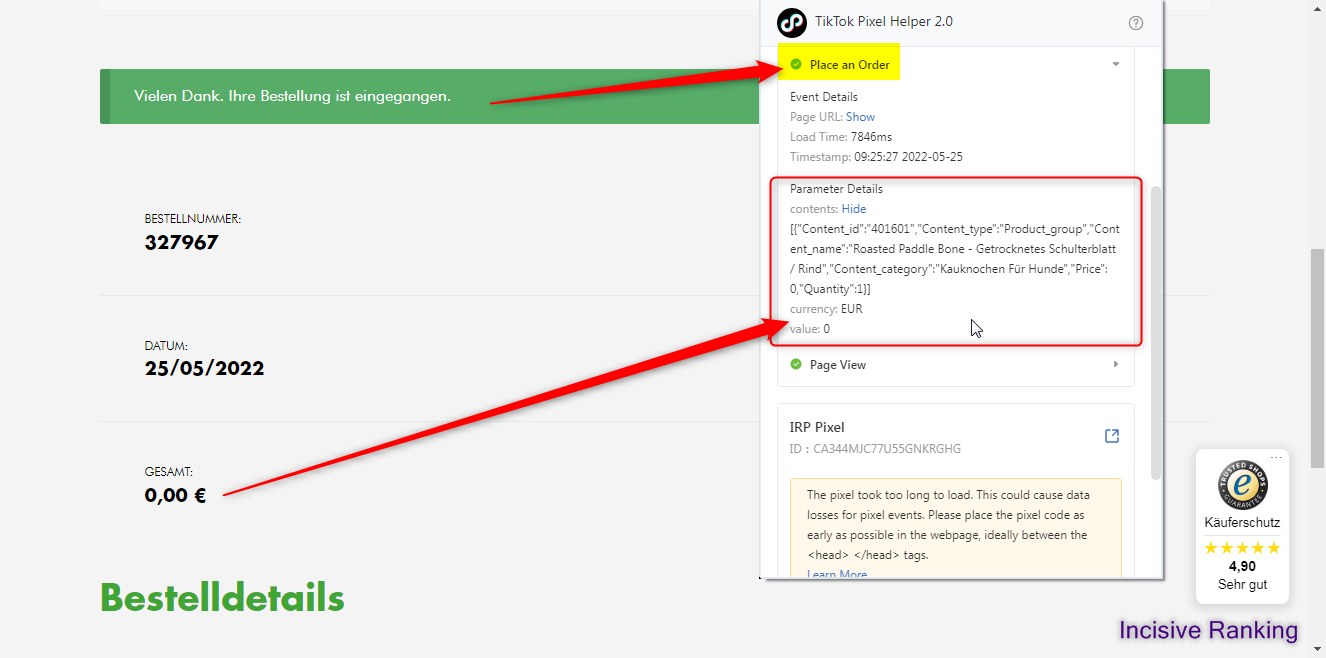
2. If the visitor completes payment on the payment gateway then somehow does not redirect to the thank you page OR the Thank you page is not loaded correctly in the visitor’s Browser OR maybe the visitor closes the tab too early by just seeing the thank you page initial load starting.
At that time, the tag will not be fired but online store register sales and data discrepancies take place.
3. There are many other reasons for E-Commerce Shopping Store Sales Data never Match with Analytics.
Still, Server side tracking is considered the most accurate data collection compared to current client-side tracking.
Automatically provision tagging web server vs manually provision tagging web server
There are two ways to configure your tagging server to enable server side tracking.
AUTOMATIC PROVISION
Google will immediately set up a new web server for you on the Google Cloud Platform using this method. It’s a pretty simple procedure; simply follow the on-screen prompts and you’ll be ready to go in no time! You will, however, need a billing account linked to the Google Cloud Platform, so if you don’t already have one, get one. This method requires a bit more setup, so you may need to review the Set up server-side tagging with Cloud Run for more details.
MANUAL PROVISION
In this technique Cloud GTM server is used by Server Side GTM service providers like Stape, Addingwell, Taggrs, etc. On which we have to add a subdomain, and the platform provides first party GTM script that needs to be implemented on the website. It is a simple way to configure Cloud GTM server, but it requires extensive knowledge of Web and Server GTM containers to send data flow like: website web GTM to Server GTM to respective analytics platforms.
How to Properly Configure GTM Server Side
Now, let’s get started with your initial setup. I’ll attempt to keep things as easy as possible (even though they are more complicated in reality).
In a nutshell, the procedure is as follows:
- Create the Server Side Container
- Configure GTM on the server side
- Configuring the Server Container
- Configuring Google Analytics 4 Tags
- Test and double-check
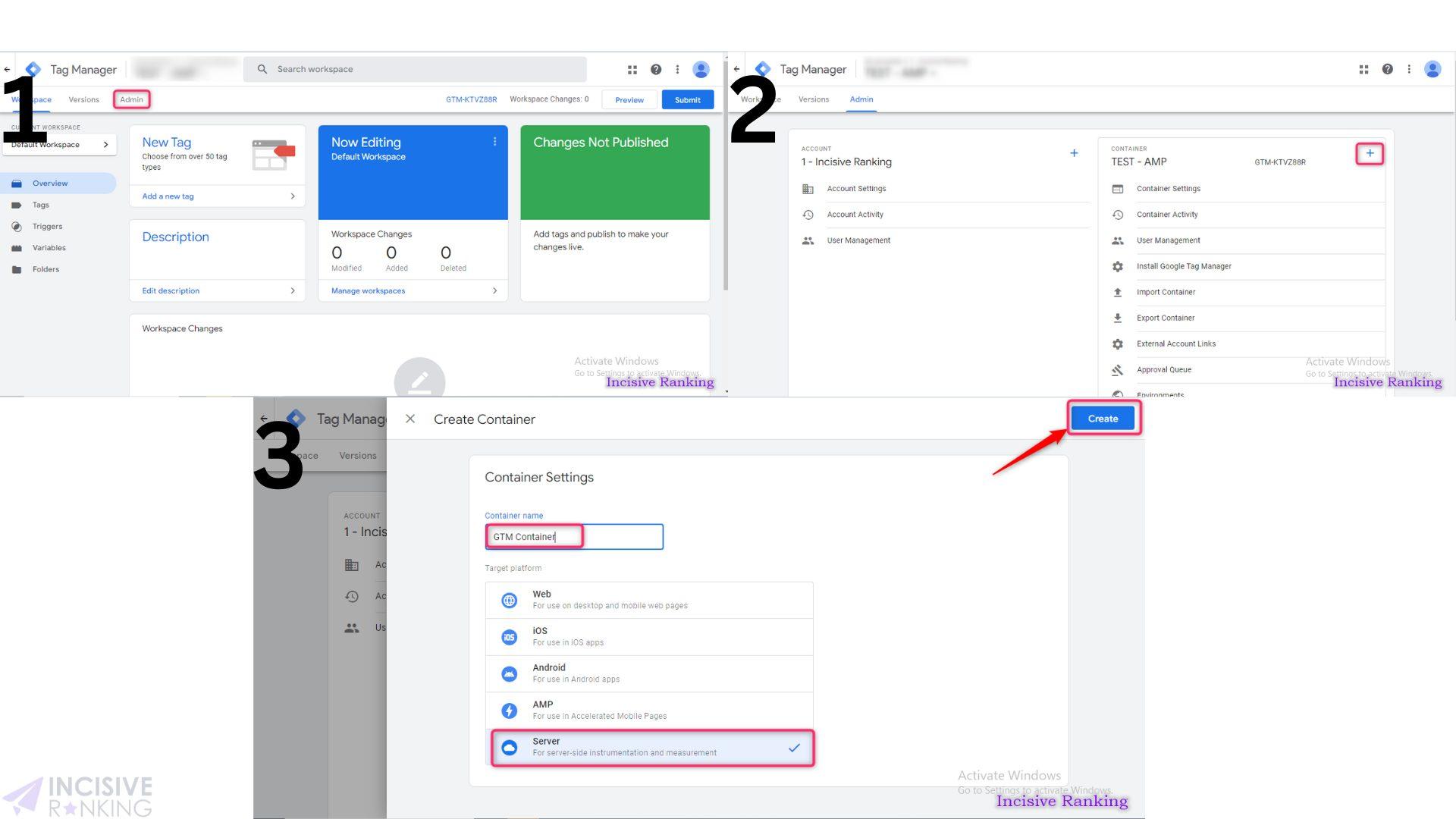
1. Create the Server Side Container
- Navigate to your Google Tag Manager account.
- Select Create Container.
- Enter your domain name.
- Choose a server.
- Press the Create button.
- Accept the terms and conditions.
The SERVER container’s default Workspace is now visible.
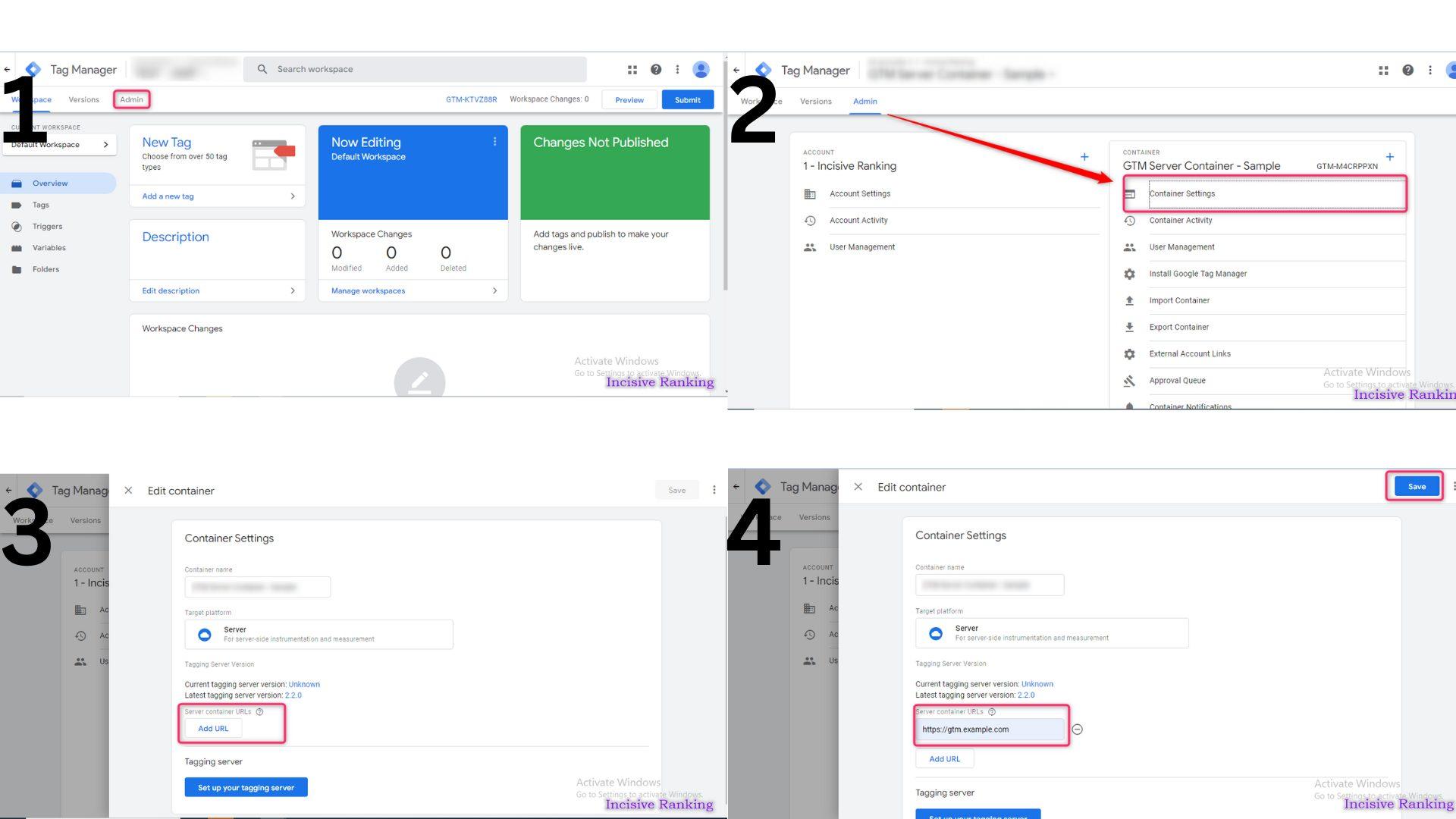
Server Container Setup
- On the upper left, click the Admin tab.
- Next, select Container Settings.
- There is an empty field labelled Server container URL there.
- Click the Set up your tagging server button under Tagging server.
- Select Manually provision tagging server once inside.
GTM Setup on Server Side
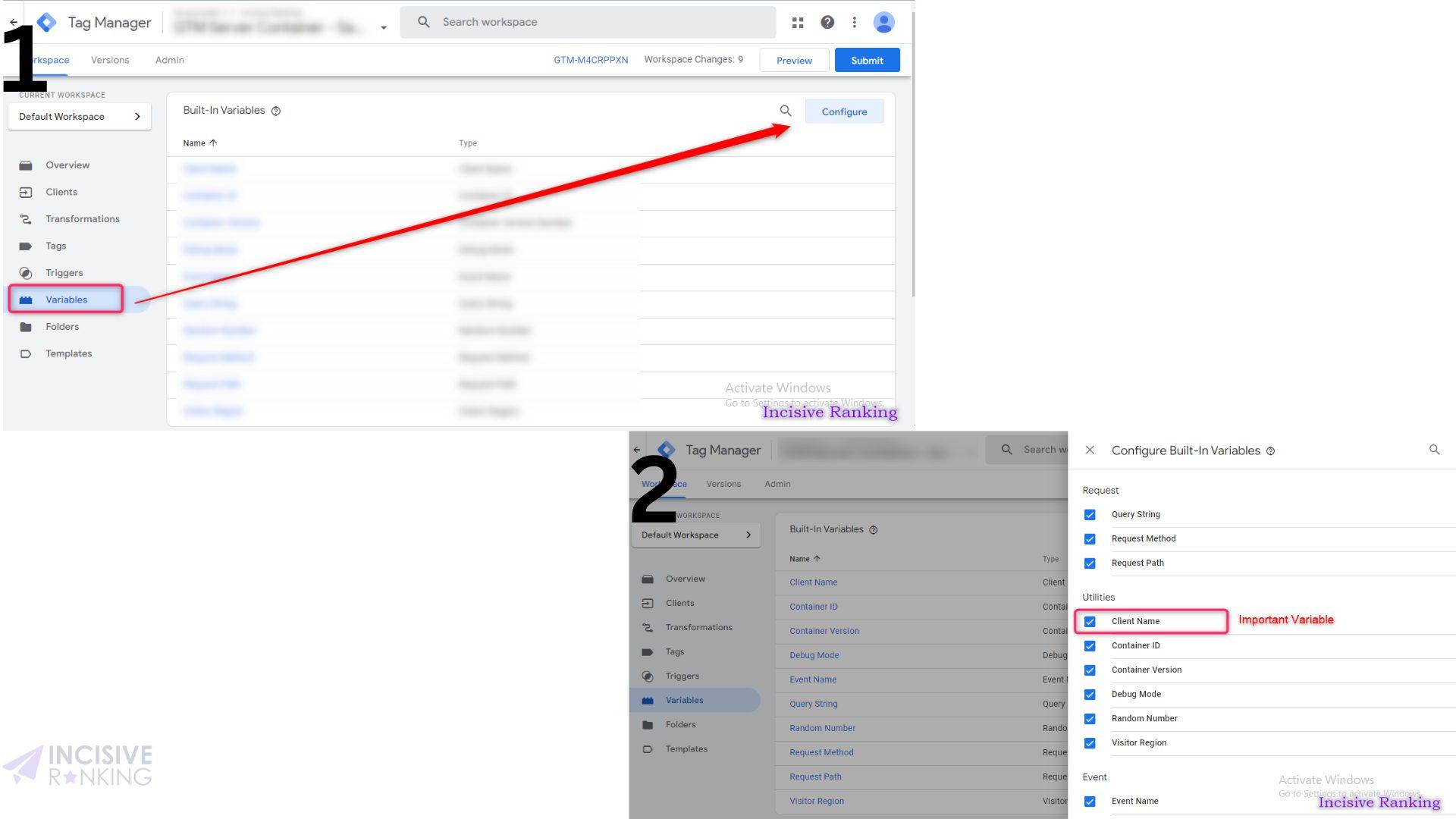
- Navigate to Clients in the newly constructed SERVER container.
The most essential piece is the ‘clients’ section, which is specific to GTM server side tagging. - Navigate to Variables.
- Select Configure once inside.
- Once inside, choose and check all of the Built-In Variables. ‘Client Name’ is the most significant variable here.
Server Side Configuration
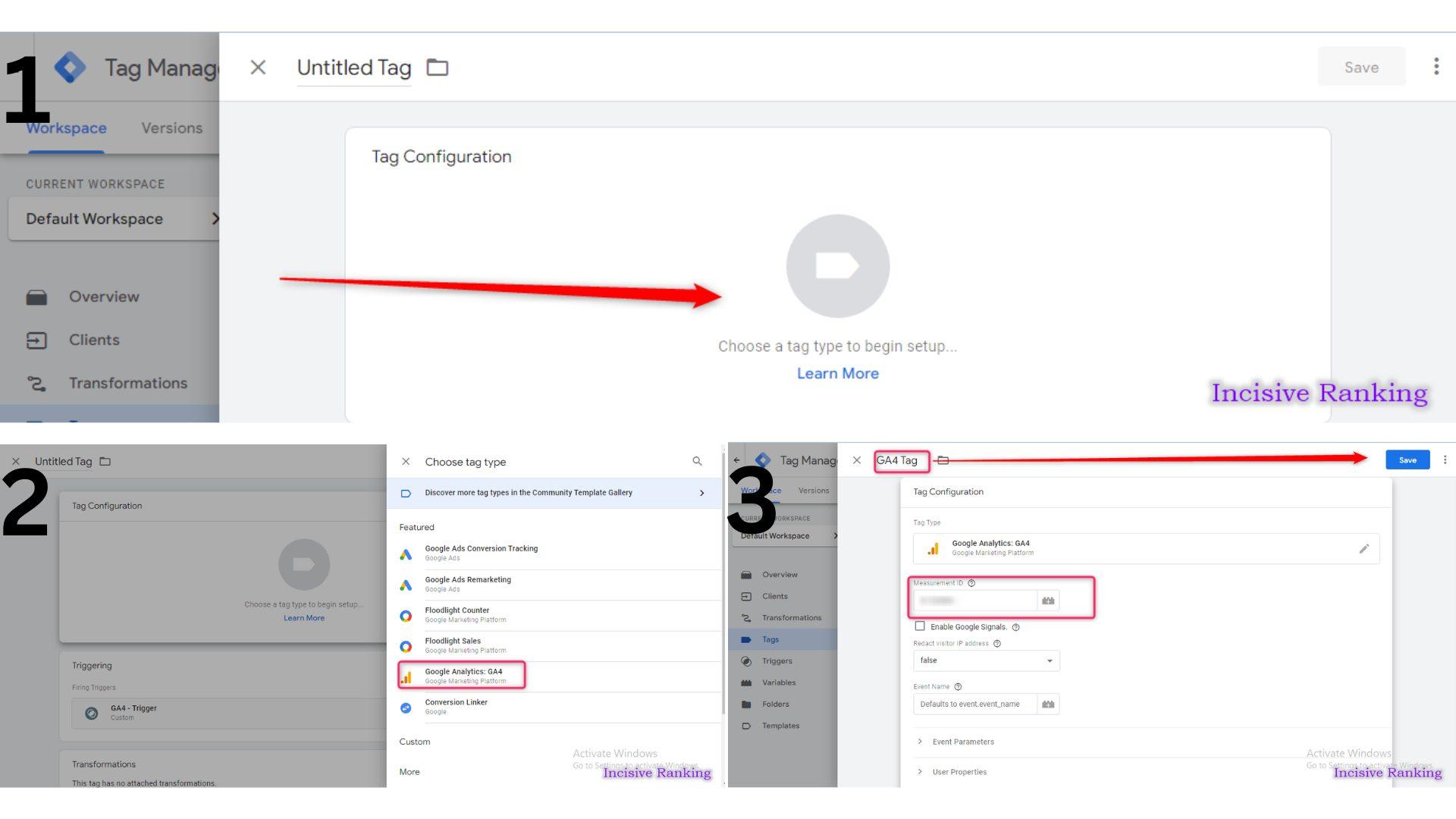
- Navigate to Tags.
- Select New.
- Give your tag a name. Then select the Edit icon.
- Choose Google Analytics: GA4.
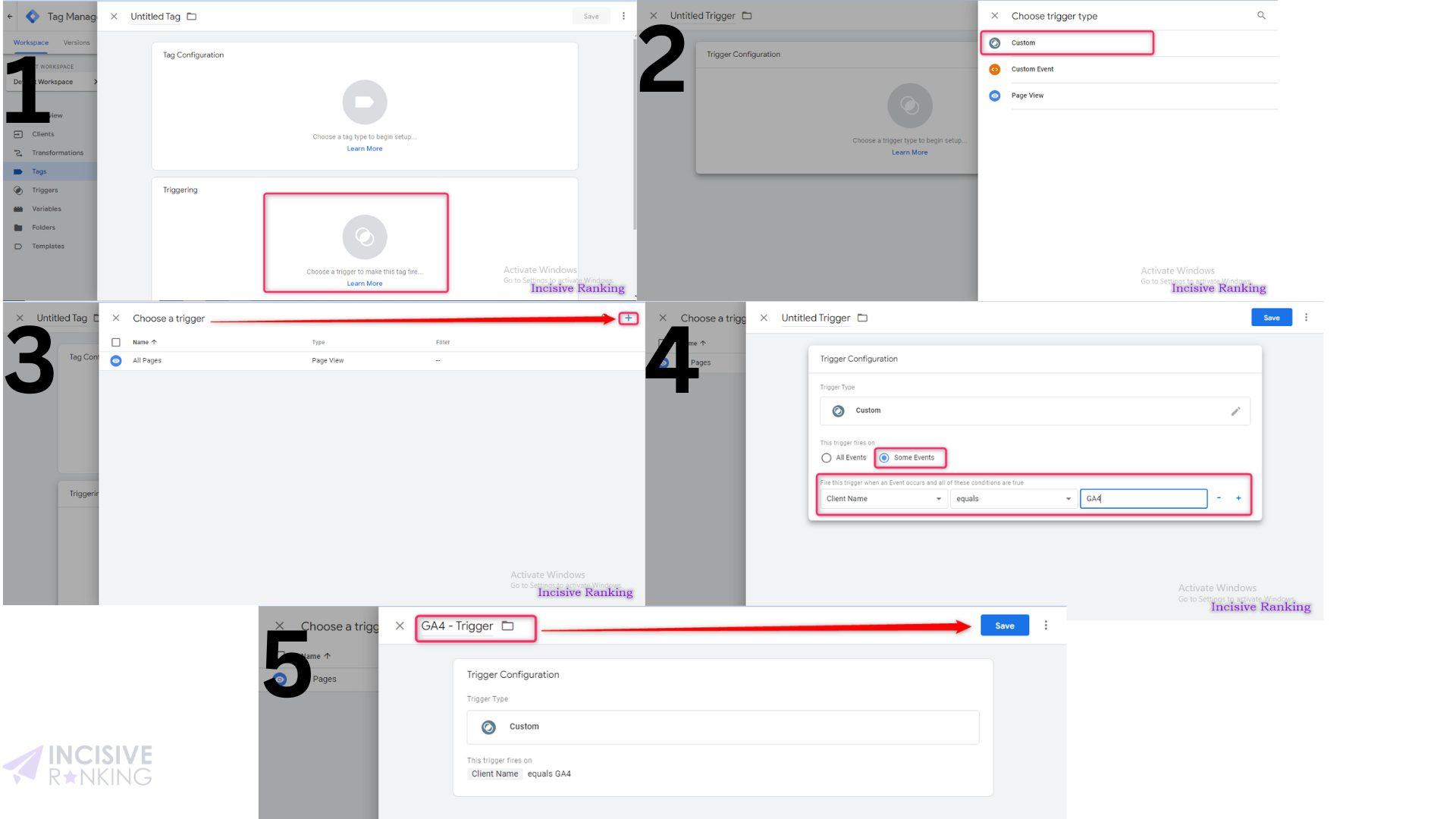
- Click the edit icon under Triggering.
- Select the Add a Trigger option.
- Give your trigger a name. Click the edit icon button and give a name to the trigger, for example, GA4 Trigger.
- Choose Custom.
- Then choose Some Events.
- Modify the parameters as follows: Client Name > Contains > GA4
GA4 Tag Setup
GA4 Trigger Setup
- Refresh the preview mode in your server side container (by clicking the “Preview” button again in the GTM UI).
- In the GTM container, enable the Preview mode.
- To begin, a Pageview tag in your web container will fire (if set to fire on All pages).
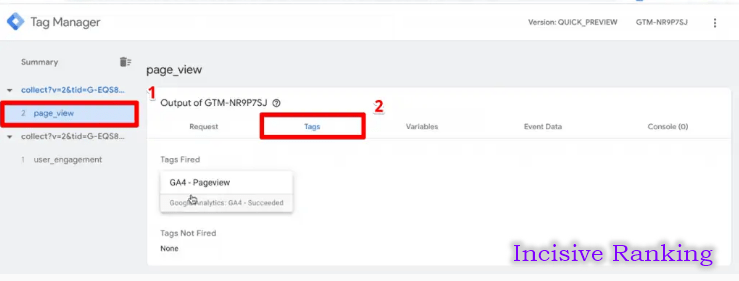
- Check the Network tab of your browser’s developer tools as well. To find the request, type “/collect” (without the quotation marks). Assume you can’t reload the website again (while /collect is still in the search box). The request should be routed to your container’s domain (which should include […]appspot.com) rather than to google-analytics.com. If the status of this request is 200, everything is well.
- Then, in the server GTM container’s preview mode, check to verify if the request was received. If this is the case, it will appear on the left side of the preview mode.
- Check to see if the GA4 tag in your server container fired. You can view the data given to Google Analytics by clicking on the tag.
- Examine the preview mode’s other tabs, such as Event Data.
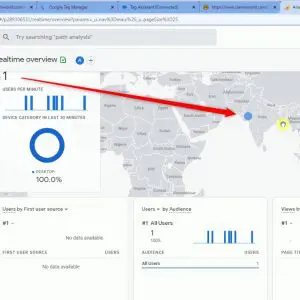
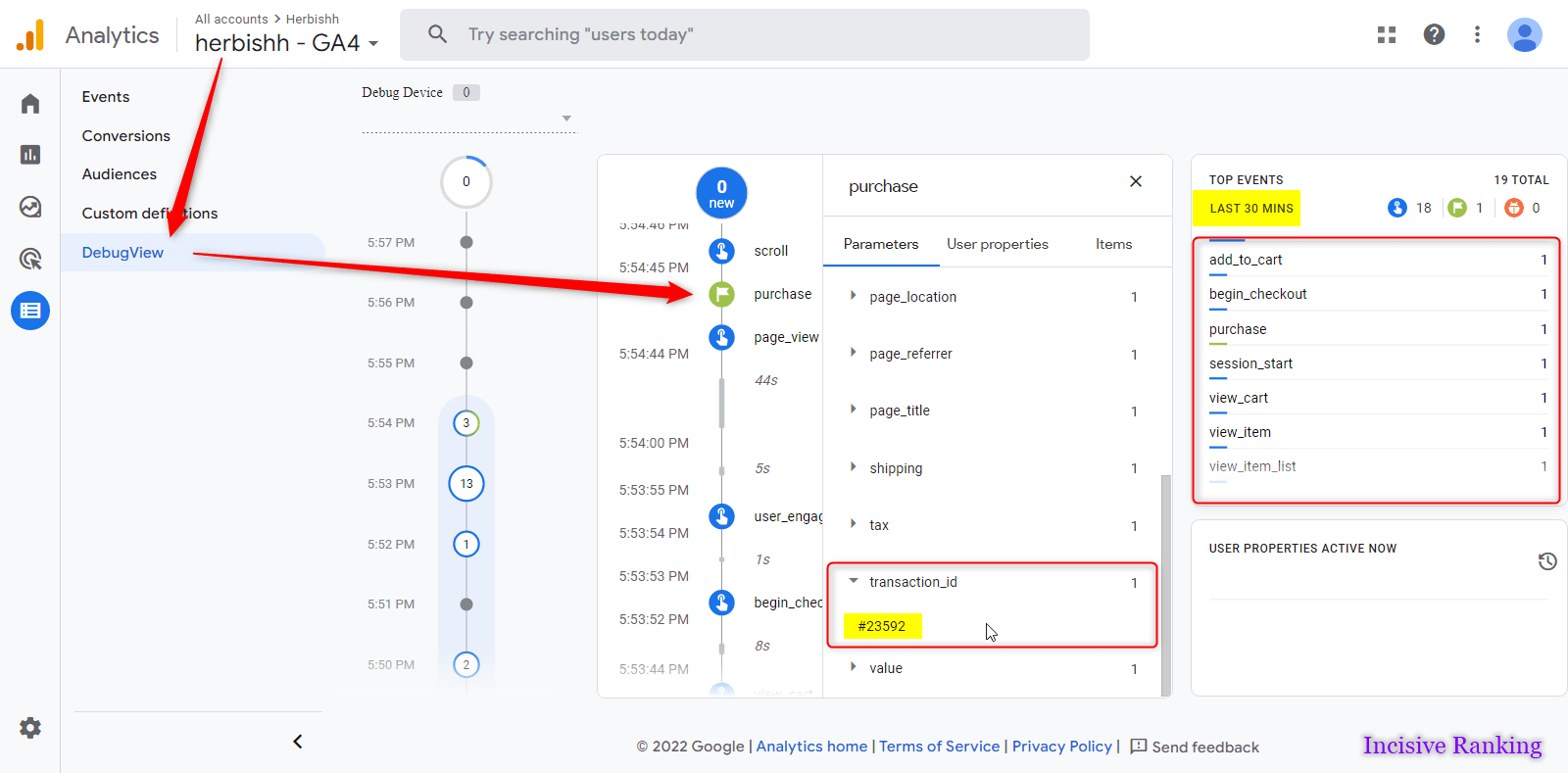
- Finally, check your GA4 real-time reports to see if the data is displayed (it should be).
Don’t forget to publish the server container after everything is ready.
Server Container Preview Mode
Summary
Server-side tracking sends your conversion and user data directly from your server instead of relying only on browsers. This makes tracking more accurate, reliable, and privacy-friendly. It reduces data loss caused by ad blockers, browser restrictions, and cookie limitations, ensuring platforms like GA4, Google Ads, and Meta receive cleaner data. Server-side tracking also improves site performance, gives you better control over data sharing, and helps future-proof your analytics in a privacy-first world.




I am also available here!


