
No products in the cart.



Facebook Conversion API (CAPI) and Pixel Setup
Overview
Pixel Tracking Precision™ Installation and Optimization:
✔ Facebook Conversion API Setup (aka Server Side Tracking)
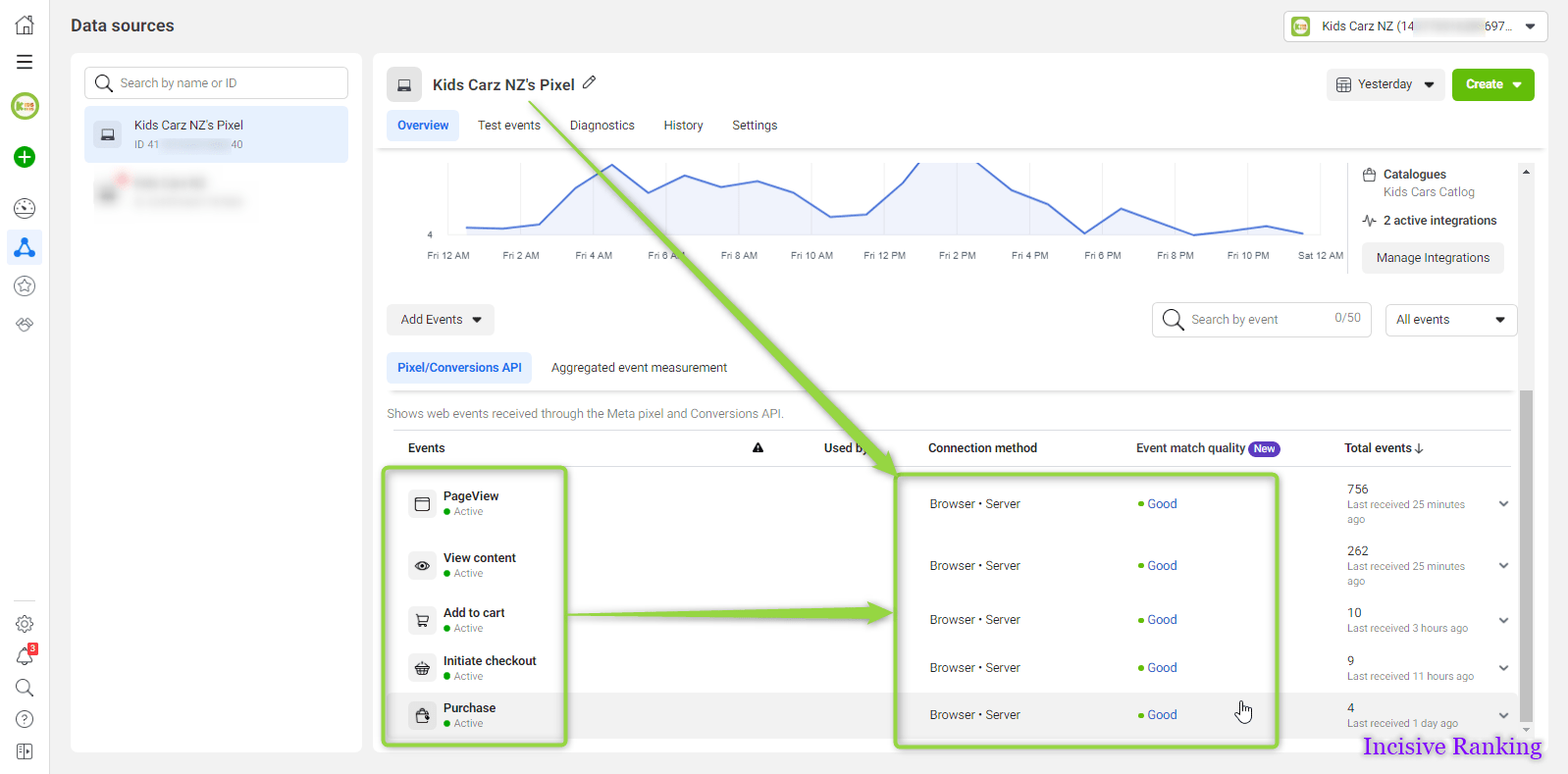
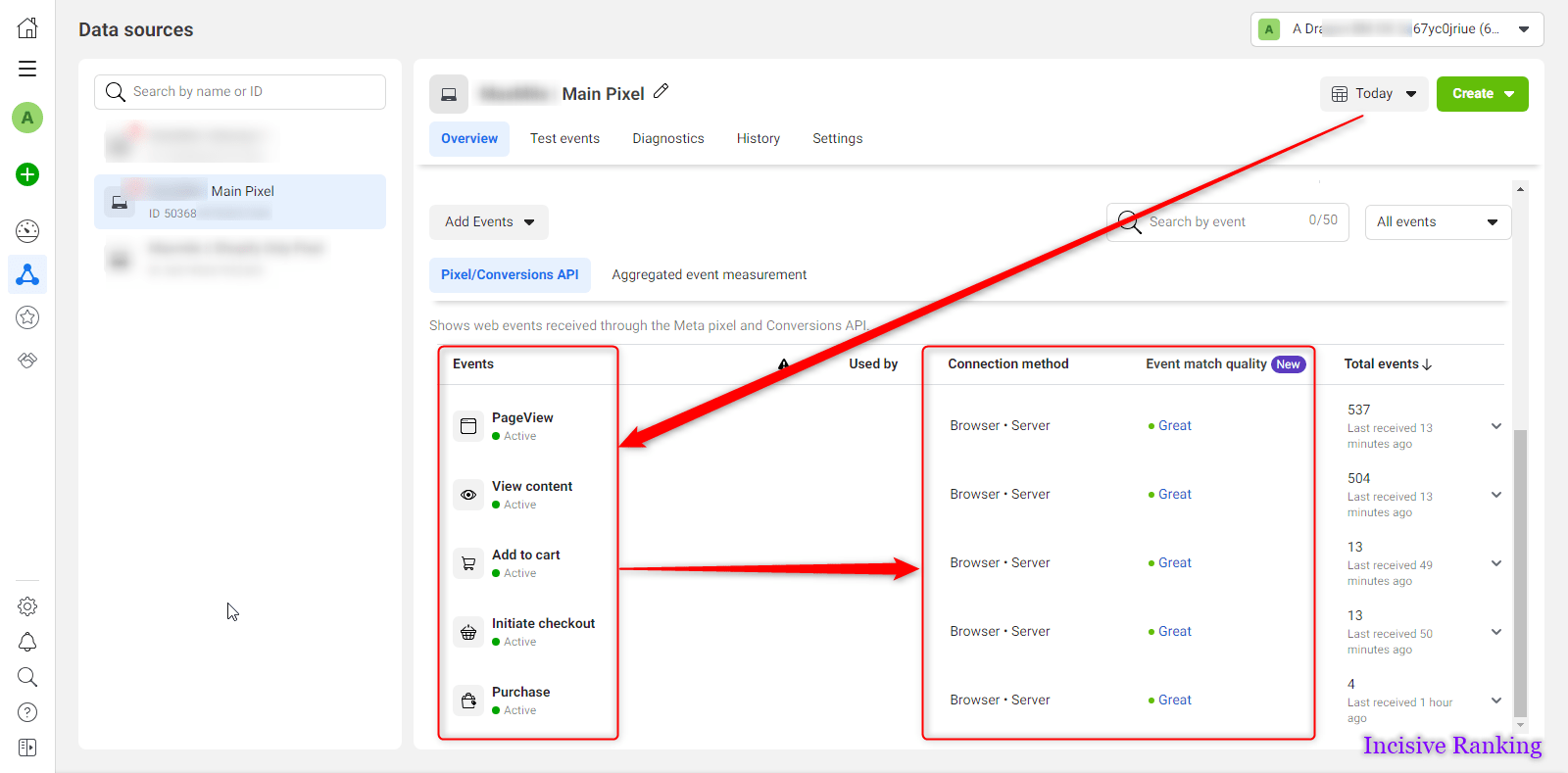
✔ eCommerce Conversion Tracking Setup (ViewContent, AddToCart, InitiateCheckout, Purchase)
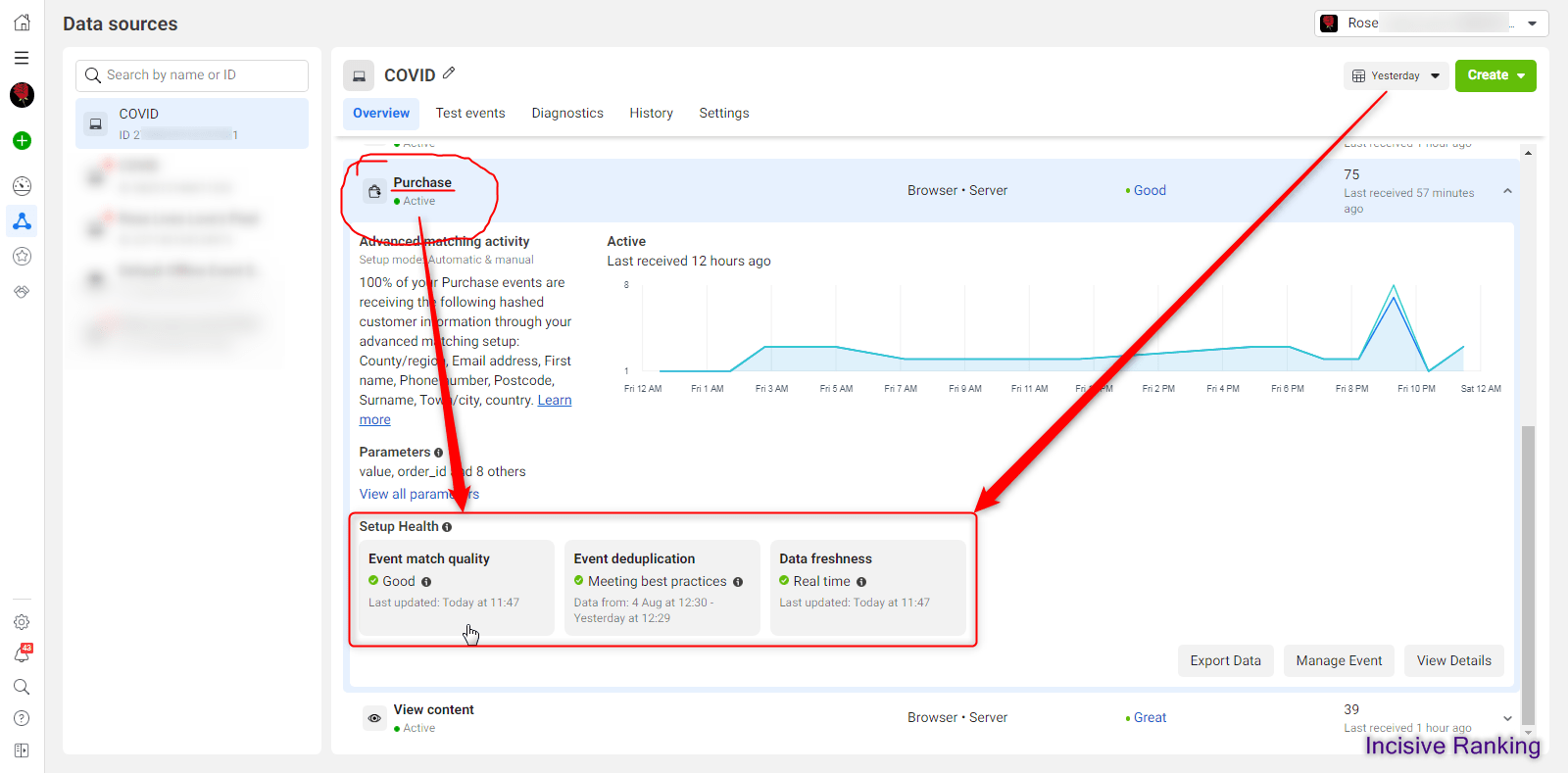
✔ Event De-duplication
✔ Quality Score Improved by Advanced Matching Parameters
✔ Fix Pixel Diagnostics
✔ Post-iOS 16 Updates
Description
Recover the Meta Conversions iOS Is Hiding From You — Facebook CAPI Setup
Since iOS 14, the Meta pixel alone misses a huge share of your conversions — which makes your ROAS look worse than it is and starves the algorithm of data. The Facebook Conversion API sends conversions server-side, directly from your server to Meta, with proper deduplication. We set it up end-to-end so you recover lost attribution, improve match quality, and let Meta’s algorithm find more buyers.
About the Service:
Looking to unlock 90–95% accurate tracking data from your Meta ad campaigns? Our Facebook Conversion API (CAPI) and Pixel Setup service helps you capture every critical conversion event—across Shopify, WooCommerce, WordPress, and more.
With this implementation, you eliminate data loss, fix broken tracking, and fuel campaign performance using deduplicated events and reliable server-side tracking for Facebook. Whether it’s leads or purchases, our setup ensures your data pipeline is accurate, privacy-compliant, and ready to scale.
📈 The Precision Profit Package: Facebook CAPI + Pixel Integration
1. Pixel Tracking Precision™ Installation & Optimization
- ✔ Full Facebook Pixel setup with standard and custom conversion events
- ✔ Complete CAPI implementation for Facebook using server-side GTM or cloud methods
- ✔ eCommerce tracking for ViewContent, AddToCart, InitiateCheckout, Purchase
- ✔ Custom Data Layer development to power your conversion tracking pixel
💡 Perfect for businesses that want to set up conversion tracking in Google Ads for Shopify, WooCommerce, Magento, Wix, BigCommerce, or custom platforms.
2. Advanced Event Parameter & Server Event Configuration
✔ Send enhanced parameters: Product ID, quantity, currency, dynamic order value, transaction ID
✔ Facebook server-side event tracking configuration with user identifiers for improved match quality
✔ Use hashed email, phone, name, city, and postal code for stronger attribution
✔ Deduplicate events by syncing Facebook Pixel and CAPI integration
✔ Resolve Pixel diagnostics issues and overcome iOS 16+ limitations
3. Common Issues We Fix
❌ Revenue or purchases not visible in Facebook Events Manager
❌ Pixel not firing or recording events incorrectly
❌ Duplicate conversions due to poor syncing
❌ Missing or broken CAPI setups
❌ Unresolved diagnostics errors in Ads Manager
💬 We set up purchase conversion tracking for Google Ads with deduplicated events and clean implementation to ensure data integrity.
💡 Your Tracking Isn’t Just Numbers—It’s Strategy
🎯 Why Our Facebook CAPI Tracking Is a Game-Changer
- Eliminate Wasted Ad Spend
Gain clarity on exactly which campaigns drive revenue. Our conversion CAPI Facebook setup ensures every key action—like purchases, leads, or add-to-carts—is tracked accurately, even when ad blockers or browser restrictions are in place. - Optimize Algorithm Learning
With synchronized browser and server data, our clean and deduplicated event structure enables Facebook’s algorithm to optimize more effectively, improving campaign performance across the board. - Future-Proof Tracking with Server-Side Architecture
We implement scalable server-side tracking for Facebook, helping you maintain reliable data flows even as privacy policies, iOS updates, or third-party cookie restrictions evolve.
🙋 Why Incisive Ranking?
We @ Incisive Ranking are certified Web Analytics experts with over 2,500+ completed projects across multiple platforms. We specialize in CAPI implementation for Facebook, GA4, and advanced server-side tagging setups using GTM.
Our Core Advantages:
- 🏆 8+ Years in Conversion & Event Tracking
- 🔧 Deep Expertise in Facebook Pixel and CAPI integration
- 🛠️ Pro-level experience with Shopify, WooCommerce, WordPress
- 🎥 Setup video walkthroughs provided after every implementation
- 🤝 3-Month Support for Ongoing Adjustments
- 📈 100% implementation transparency + audit-ready reports
Client ReviewsWhat clients say after fixing
What clients say after fixing
their tracking.
Real reviews from Fiverr & Upwork. No screenshots — just the actual words.
FIVERR
★★★★★
Fixed my server-side GTM setup for Shopify. Facebook ROAS jumped from 1.4x to 3.6x within weeks. Incredible work.
S
Sarah M.
Shopify Owner · 🇬🇧 United Kingdom
UPWORK
★★★★★
After adjusting TikTok tracking, conversions became visible for the first time. This completely changed our business. Highly recommended.
R
Ryan K.
E-commerce Director · 🇺🇸 United States
FIVERR
★★★★★
Compared GA4 with Shopify data and found hidden tracking issues I didn't even know existed. Everything was optimized perfectly.
A
Aisha T.
Digital Marketing Manager · 🇦🇺 Australia
FIVERR
★★★★★
"I have worked with Bipin many times and he always does an exceptional job. Thank you!"
R
roylipski
REPEAT CLIENT
🇺🇸 United States · 1 month ago
FIVERR
★★★★★
"Bipin is highly professional, completed GTM & multiple tracking configurations. Second time working together — 3-month warranty included. Communication makes all the difference. A reliable, professional partner!"
D
deepinvogueroma
REPEAT CLIENT
🇷🇴 Romania · 2 months ago · 4 days delivery
FIVERR
★★★★★
"Extremely thorough and knowledgeable of FB ads tracking and willing to troubleshoot if not working and figure it out until it works. Really appreciated his helpfulness."
R
robbleleman
🇺🇸 United States · 10 days delivery
FIVERR
★★★★★
"Bipin and team delivered the project efficiently with timely communication. Thank you and looking forward to working together again in the future."
L
letterbox4you
🇬🇧 United Kingdom · 4 days delivery
FIVERR
★★★★★
"Thank you for handling the Pinterest API connection. Would definitely recommend this freelancer to anyone needing tracking setup help."
K
kkelan55
🇺🇸 United States · 2 months ago · 1 day delivery
FIVERR
★★★★★
"Strong technical foundation and highly professional. Integrated Microsoft UET & multiple tools, provided a demo to ensure no loopholes. Efficient delivery and polite team."
A
amdebfre
🇺🇸 United States · 1 month ago · 4 days delivery
🚀 Ready to Track Conversions with 95% Accuracy?
Whether you need Facebook Conversion API for Shopify and WooCommerce or want to install conversion tracking in WordPress using GTM, we’ll help you capture reliable, performance-driven data.
Book your Tracking Transformation Call now—and take the guesswork out of Meta ads with a powerful blend of Facebook server-side event tracking configuration and best-practice pixel setup.
I am available here!
Find Me On
2500+ Projects Completed

35+ Projects Completed

10+ Projects Completed

55+ Projects Completed

FAQS Related to Facebook Conversion API (CAPI) and Pixel Setup
What is Facebook Conversion API (CAPI)?
Facebook Conversion API (CAPI) allows businesses to send web and offline events directly from their server to Facebook. It works alongside the Facebook Pixel to improve data accuracy and conversion tracking, especially when browsers block cookies.
Why should I use both Facebook Pixel and CAPI together?
Using both provides more accurate tracking. While the Pixel captures browser events, CAPI captures server-side data, helping recover lost conversions due to browser restrictions, ad blockers, or iOS 14+ privacy updates.
Is Facebook CAPI setup required after iOS 14 privacy changes?
Yes. iOS 14’s App Tracking Transparency significantly limits data captured via traditional pixels. Facebook recommends implementing CAPI to maintain ad performance, accurate reporting, and audience targeting.
Can I set up Facebook CAPI using Google Tag Manager (GTM)?
Yes, CAPI can be set up via Server-Side Google Tag Manager containers. This requires additional configuration on your server, but it’s the most flexible and privacy-compliant way to implement Facebook CAPI.
What are the benefits of using Facebook CAPI?
- Improved data accuracy
- Better attribution
- Enhanced ad delivery
- More stable conversion tracking
- Compliance with privacy regulations
What does Incisive Ranking offer in its Facebook CAPI and Pixel Setup service?
Incisive Ranking provides complete implementation of Facebook Pixel and Conversion API, including browser- and server-side tracking, server setup, GTM configuration, testing, and full GDPR-compliant integration.
Can Incisive Ranking help with Facebook CAPI setup on Shopify or WordPress?
Yes. Incisive Ranking specializes in platform-specific setups including Shopify, WordPress, WooCommerce, and custom-coded websites—ensuring seamless integration and optimal event tracking.
Why should I trust Incisive Ranking for Facebook tracking implementation?
Incisive Ranking combines deep technical knowledge with a marketing-first mindset. We don’t just implement CAPI—we optimize it to match your business goals, improve conversion accuracy, and unlock better ad performance.
Is Incisive Ranking’s Facebook tracking setup compliant with GDPR and global privacy laws?
Absolutely. We implement CAPI and Pixel using privacy-first best practices, including Google Consent Mode, user consent flows, and secure server configurations where needed.
How do I get started with Facebook CAPI setup from Incisive Ranking?
Simply purchase the service through our website. Our team at Incisive Ranking will onboard you with a custom plan, configure your server-side GTM container, and implement everything from pixel to advanced matching.


