
No products in the cart.



GA4 Custom Conversion Setup
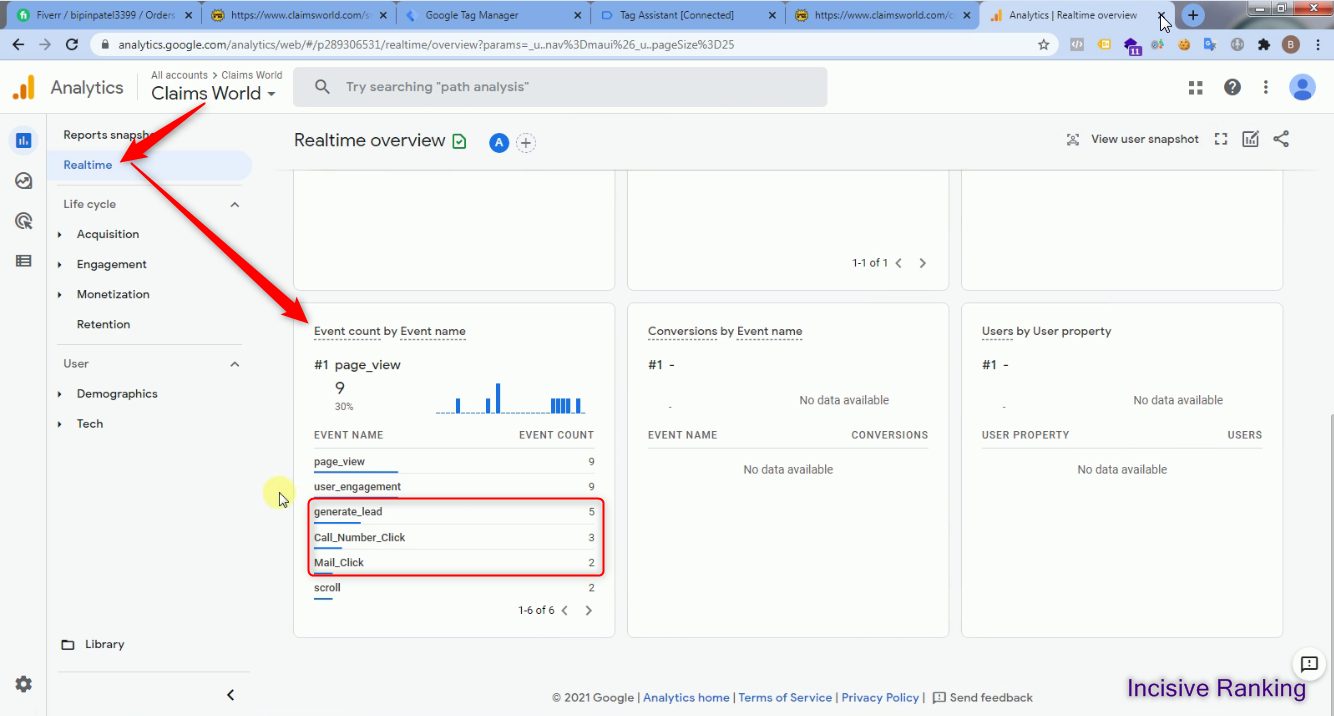
Here, I have attached the Successful Past Projects’ Results of my previous clients for GA4 Custom Conversion Tracking .
✅ Services Included in This Setup:
We don’t just install tags—we solve problems and maximize accuracy. Here are the core features delivered in our advanced GA4 Custom Conversion setup:
- ✔ GA4 Custom Conversion Events via Google Tag Manager
- ✔ Custom Event Tracking: Contact Form Submission, Click-to-Call, Mail Clicks, Outbound Link & Button tracking
- ✔ GA4 eCommerce Tracking Events: Product Impression, Product Click, Product PageView, AddToCart, RemoveFromCart, InitiateCheckout, Purchase
🛠️ Fixes for Common GA4 Custom Conversion Tracking Issues
We often resolve:
- ❌ Missing or incomplete custom conversion events (form, click-to-call etc.)
- ❌ eCommerce events not firing or being captured
- ❌ Duplicate or misconfigured tags skewing data
- ❌ GA4 not showing events or data delayed beyond 24 hours
💡 If you’re asking, “are my GA4 Custom Conversions correctly implemented?”, we’ve got you covered.
🎯 Capturing Rich Conversion Data
We make sure every key interaction is tracked, including:
- Contact Form Submissions, Call Clicks, Mail Clicks, Outbound Button/Link hits
- Product-level eCommerce data: impressions, clicks, page views, add/remove from cart, checkout initiation, purchases
This drives insight into user behavior across your entire funnel.
🚀 Why This GA4 Setup Works
- Deeper Insights – track custom, business‑specific events
- Enhanced Customization – tailor data to goals like form fills or downloads
- Adaptable Measurement – set multiple micro/macro conversion goals
- Better Optimization – use GA4 insights to improve engagement, funnel flow, and conversion rates
👨💻 How It Works
- Implement GA4 via GTM using your Measurement ID
- Configure tags & triggers in GTM for each custom event
- Mirror event names and parameters in GA4 Events section
- Test in Preview mode, publish, and track data (visible in GA4 ~24 hrs later)
✅ Ready to Improve Your GA4 Conversion Tracking?
Book a Free 30‑minute Tracking Transformation Call to audit or implement GA4 Custom Conversions—tailored, accurate, and actionable.
Are your GA4 Conversion Tracking correctly implemented?
Custom Conversion Tracking


What are GA4 Custom Events?
Google Analytics 4 Custom Events let you track specific user interactions, behaviours, and goals (for example, you can setup a Google Analytics 4-click event with calltoclick and mail click on your website). Unlike GA4’s Enhanced Measurement events, which are predefined, these events are tailored to your specific business needs, giving you unprecedented freedom and control over your data.
Conversions are key interactions that you want your visitors/users to accomplish so that you can better understand what is and isn’t working for your business. GA4 conversions are essentially a new name for what was previously known as ‘goals’ in Universal Analytics.
GA4 conversions are classified as micro and macro. A micro-conversion, for example, could be a Form Submission, CalltoClick, Mail Click, download or newsletter subscription, but macro-conversions are the most essential interactions, such as a purchase.
Are you facing an issue while setting up GA4 Conversion Tracking?
How does Google Analytics 4 Custom Conversion Tracking work?
First, you need to implement the GA4 Custom Conversion Tracking Code in the backend of your website. Then once you setup the tags and tracking by using Google Analytics 4 tracking ID through Google Tag Manager and publish it, GA4 starts tracking conversion and will display in the report after 24 hours. Let’s understand with a scenario, a user visits your website and clicks on the telephone number given, then GA4 with the help of tags setup in GTM will track the conversion as a click event and display it on the Google Analytics 4 reports. Google Analytics 4 feature is compatible with all kinds of ads as well as website event tracking.
Benefits of using GA4 Custom Events
Here are four significant advantages of implementing GA4 Custom Conversion Events in your portal and tracking activity and conversions, ranging from deeper insights to greater optimization.
- More in-depth insights
Companies require detailed information about user interactions and behaviours on their websites or apps. GA4 Custom Events give you more information into how people interact with your content, what actions they take, and where they abandon it. This useful data can assist you in identifying strengths and shortcomings in your marketing funnel, uncovering new opportunities, and optimizing your methods.
- Enhanced customization
allow you to provide your consumers with highly personalized experiences. You can, for example, employ unique event categorization to track user preferences, interests, or engagement with certain material, and then use that information to deliver tailored messages or offers. This level of personalization and granularity can greatly assist you in gaining a better understanding of your audience to improve your strategy and generate stronger engagement, experience, loyalty, and conversions, resulting in increased revenue and customer happiness.
- Adaptable measurement
With insightful data, you may design your conversion goals based on your company objectives. Custom Events data allows you to track and measure what is most important to your business. It also allows you to track numerous conversion targets at the same time, providing you with a comprehensive perspective of your marketing success and assisting you in optimizing your strategy accordingly.
- Better optimization
For improved business outcomes, companies must optimize their marketing efforts with relevant data. Using GA4 insights to understand how visitors interact with your website or app, you may spot bottlenecks, drop-off points, or places for improvement and take remedial actions to optimize your conversion rates, user engagement, and overall performance.
How to install Google Analytics 4 Custom Conversion Tracking?
You can setup GA4 Custom Conversion Tracking easily in 5 simple steps:
- Go to the admin area of the GA4 Property and click on events.
- Create an event with a name such as call_click, mail_click etc.
- Create a GTM container and add the tags and trigger. Don’t forget to include the Google Analytics 4 tracking ID in your tags.
- Copy the event name in the GA4 event and paste it into the GTM container.
- Test the container and publish it.
Conclusion
Setting up and tracking conversions in Google Analytics 4 can be a complicated process, but understanding how website visitors interact with their content and take action is critical for all kinds of organizations. Businesses may guarantee that they are collecting the data they need to make informed decisions about their marketing strategies by setting up GA4 Custom Conversion Tracking as Google Analytics 4 features can capture everything.
Please contact us if you have any queries about configuring or tracking conversions in Google Analytics 4. We would be delighted to assist you in getting started.
[ninja_form id=”3″]
I am available here!
Find Me On


