
No products in the cart.


Microsoft Bing Ads UET Conversion Tracking Setup
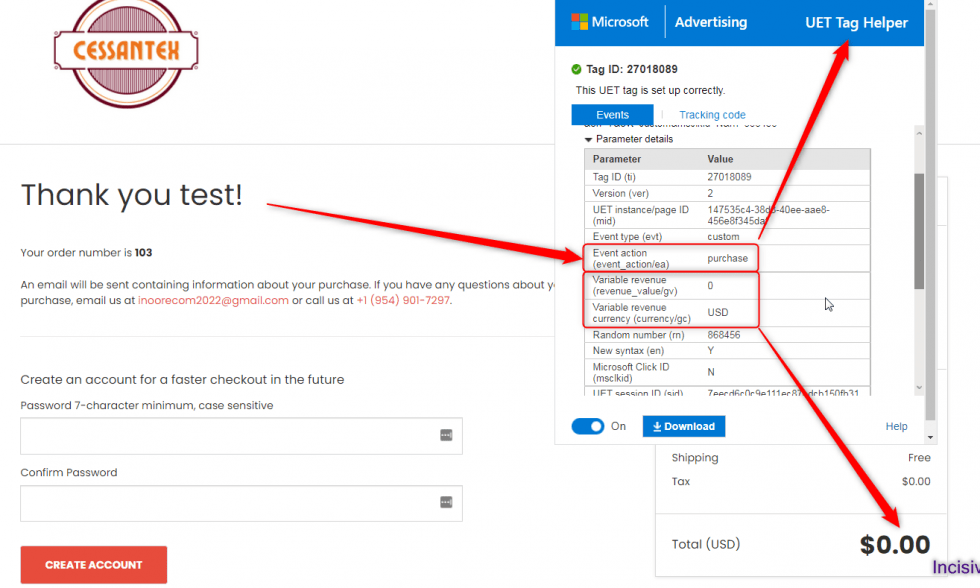
Here, I have attached the Successful Past Projects’ Results of my previous clients for Microsoft Bing Ads UET Conversion Tracking
✅ Services Included in This Setup:
We don’t just install tags—we solve problems and maximize accuracy. Here are the core features delivered in our advanced UET setup:
- ✔ Universal Event Tracking (UET) tag implementation and optimization
- ✔ eCommerce Conversion Tracking: Purchase, AddToCart, BeginCheckout
- ✔ Contact Form Submission events
- ✔ Click‑to‑Call & Mail Click tracking
- ✔ Outbound Link Click and Button/Link Event tracking
- ✔ Custom Data Layer implementation for all events
- ✔ Implementation support for Shopify, WooCommerce, Magento, Squarespace, Wix, BigCommerce, and custom CMS
🛠️ Fixes for Common Bing Ads Tracking Issues
We often resolve:
- ❌ No conversion data showing in Microsoft Ads (formerly Bing Ads)
- ❌ UET tags not firing or misconfigured
- ❌ Missed revenue attribution from eCommerce events
- ❌ Broken click‑to‑call, mail click, or outbound click tracking
- ❌ Inconsistent UET deployment across platforms
💡 Our UET installs are precise and comprehensive—ensuring reliable and fully accurate conversion reporting.
🎯 Capturing Rich Conversion Data
We make sure every meaningful action is captured, including:
- Purchase, AddToCart, BeginCheckout events
- Contact Form Submissions
- Click‑to‑Call and Mail Clicks
- Outbound Link Clicks and button interactions
This gives you complete visibility into customer behavior on-site.
🚀 Why This UET Setup Works
- Maximized ROI from Microsoft Ads — know which campaigns drive real results
- Unified Tag Management — one UET tag covers multiple conversion goals, streamlining tracking
- Remarketing‑Ready Data — UET functions as a built-in remarketing tag
- Seamless GTM & Platform Compatibility — works out-of-the-box with Google Tag Manager and all major CMS platforms
👨💻 Why Clients Choose Incisive Ranking
We’re not just implementers—we’re analytics strategists with deep expertise. With over 8 years’ experience and 2,500+ implementations, we specialize in:
🏷️ Google Tag Manager & Tag Strategy
📊 Microsoft (Bing) Ads UET tracking
🛒 eCommerce and form tracking (Shopify, WooCommerce, Magento, etc.)
🔄 Multi-platform tagging ecosystems (GA4, Meta, TikTok, Pinterest, Snapchat CAPI)
🔧 Server-side and client-side tagging solutions
✅ Ready to Optimize Your Microsoft Ads Tracking?
Book a Free 30‑minute Tracking Transformation Call and let us implement or audit your UET setup—giving you robust conversion insights and performance-driven ad reporting.
What is UET?
Universal Event Tracking (UET) tags provide a unified tag that logs page views and custom events—then forwards them to Microsoft Ads for goal tracking and audience creation. This is key for conversion tracking Microsoft Ads and Bing Ads Analytics Integration.
Why Should You Use Universal Event Tracking?
There are four main reasons why one should use UET conversion tracking:
- Improve your return on investment: Knowing which terms convert and which do not will help you optimize your ads more successfully.
- It’s easy to manage: Only use one tag to tag your site. There’s no need to add new tracking tags to your site every time you add a new account or conversion goal to track.
- Remarketing ready: UET conversion tracking also functions as remarketing tags, preparing you for Remarketing in Paid Search. Remarketing allows you to tailor your bids, advertising, and keywords to previous visitors to your site.
- Compatibility: Tracking tags are compatible with Google Tag Manager and other top tag management solutions.
What are the key events one should track using Microsoft Bing Ads UET Goals?
To get the most out of UET, keep note of major events on your website, such as:
- Purchase, Addtocart, BeginCheckout
- Form Submissions
- Appointments booked
- Views of videos
- Downloads
- CalltoClick and Mail Click
So, It’s very simple, first you need to consider which KPIs are important to your organization. If you have Google Ads running already or have a GA4 Conversion Tracking setup on your website, then you can use the conversions set there as a template for your reference.
How to setup Microsoft Bing Ads Conversion Tracking?
- Create a UET Tag – Microsoft Advertising account > click on Tools > Conversion Tracking > UET Tag > Create UET tag button.
- Give the name and description of the event.
- Select the manual option and copy the code.
- Paste it into Google Tag Manager Tag setup for Bing Ads.
- Save the UET Tag and Publish the GTM container.
Are you facing an issue while setting up Bing Ads Conversion Tracking?
Conclusion
To Conclude, Microsoft Bing Ads Universal Event Tracking goals are a powerful tool for advertisers looking to optimize their online campaigns and drive meaningful conversions. By implementing UET Conversion Tracking goals, advertisers can gain valuable insights into user behaviour, measure the success of their advertising efforts, and make data-driven decisions to enhance campaign performance.
Through the creation and tracking of specific goals, such as page views, form submissions, or other desired actions, advertisers can refine their targeting strategies and allocate budgets more effectively. The detailed data provided by Universal Event Tracking Goals enables advertisers to understand which aspects of their campaigns are driving results and which may need adjustment.
I am available here!
Find Me On


